
If Accept
The 'If Accept' order is used to finalize an If Sale. The 'If Accept' is launched from the Dealer Profile or Vehicle Orders application.
- Select Dealer Profile Application.
- Search vehicle VSN or VIN or Scroll to the Seller Name.
- Select the Vehicles tab if you search by Seller Name to find the vehicle.
- Once the IF Sale Vehicle is found and Highlighted
- Select the 'IF Accept' button from the Order menu to launch the form.
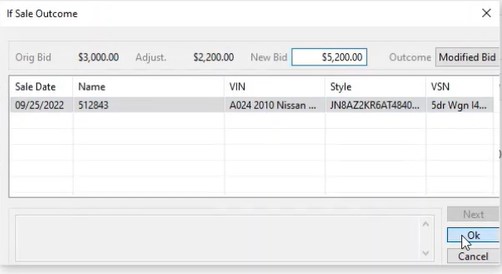
- You can change the bid amount here in the "New bid" field in this example the $5200.
-
If the Deal falls apart input $0.00 in the "New Bid" field.
- Click the "OK" Button to complete.
Note: Do not use this order unless you are ready to Sell or 'If' Down the vehicle.
No Comments