
Refund Settlement
Refund Settlements are used to write Checks to a Buyer who has Credit on their Account. Refund checks may be written for 'Credits' resulting from the following transactions:
Buy Settle with an Over-payment
No Sale order when the buyer's check has been deposited
Note: Refund checks may not be issued for any other reason than those listed above. You may not issue a negative Adjustment to a buyer's account and then write a Refund check for the balance.
- Open the Buyer account of the vehicle you wish to execute the Refund Settlement on.
- Select the 'Refund Settlement' order from the Account Tab of the Dealer Profile and click to launch the form.
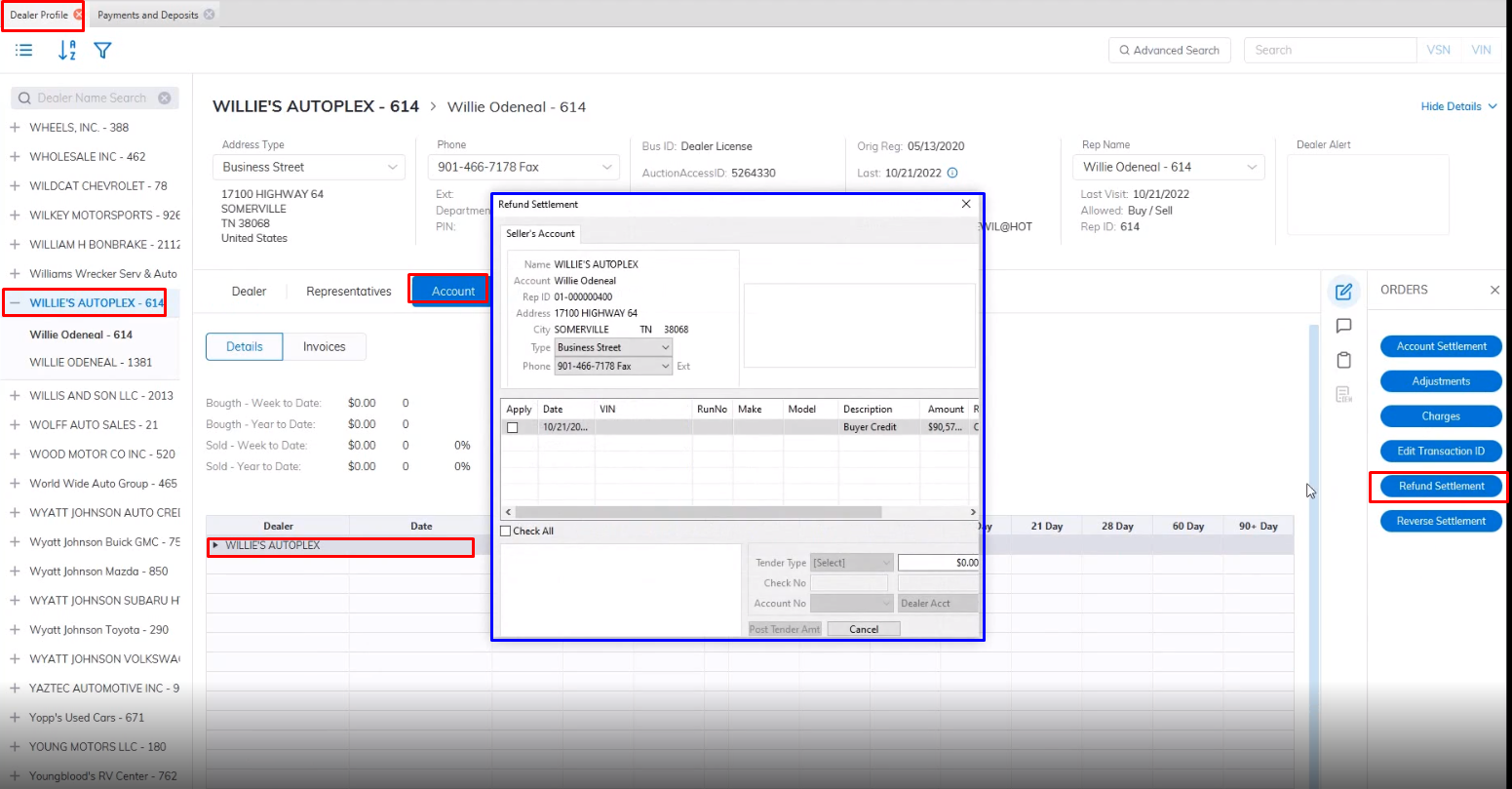
- Select the Check of the Refund
- Select the Tender you will use to make the payment. If you choose the Check option the system will auto-generate the next Check No.
- Click the Post Tender button when done to complete.
Once you have completed the 'Refund Settlement' order it will appear in the 'Orders' node in the Account Tab of the Dealer Profile along with the check number if a check was used.
No Comments