# Lot Sale Order

<span style="font-size: medium;">The Lot Sale is used to Sell Vehicles that are not on the Block. The order may be launched from two places:</span>

- [**<span style="font-size: medium;">Vehicle Orders </span>**](https://cam3-wiki.auctionstreaming.com/books/cams-3-wiki-faq/page/vehicle-orders)
- [**<span style="font-size: medium;">Dealer Profile</span>**](https://cam3-wiki.auctionstreaming.com/books/cams-3-wiki-faq/page/dealer-profile)

<span style="font-size: medium;">Lot Sales may be performed on vehicles that are:</span>

- **<span style="font-size: medium;">[Checked In](https://cam3-wiki.auctionstreaming.com/books/cams-3-wiki-faq/page/check-in-order) </span><span style="font-size: medium;">(CI) </span>**
- **[<span style="font-size: medium;">Roll over</span>](https://cam3-wiki.auctionstreaming.com/books/cams-3-wiki-faq/page/roll-over-order)<span style="font-size: medium;"> (RO) </span>**
- **<span style="font-size: medium;">No Show </span><span style="font-size: medium;">(SH) </span>**
- **<span style="font-family: Arial;">[<span style="font-size: medium;">No Sale</span>](https://cam3-wiki.auctionstreaming.com/books/cams-3-wiki-faq/page/no-sale)<span style="font-size: medium;"> (NS)</span></span><span style="font-family: Times New Roman; font-size: medium;"> </span>**
- **<span style="font-family: Arial;"><span style="font-size: medium;">If Down</span> <span style="font-size: medium;">(ID)</span> </span>**
- **<span style="font-family: Arial;">[<span style="font-size: medium;">Turn Down</span>](https://cam3-wiki.auctionstreaming.com/books/cams-3-wiki-faq/page/arb-and-arb-accept) <span style="font-size: medium;">(TD)</span> </span>**

**<span style="text-decoration: underline;"><span style="font-size: medium;">Dealer Profile</span></span>**

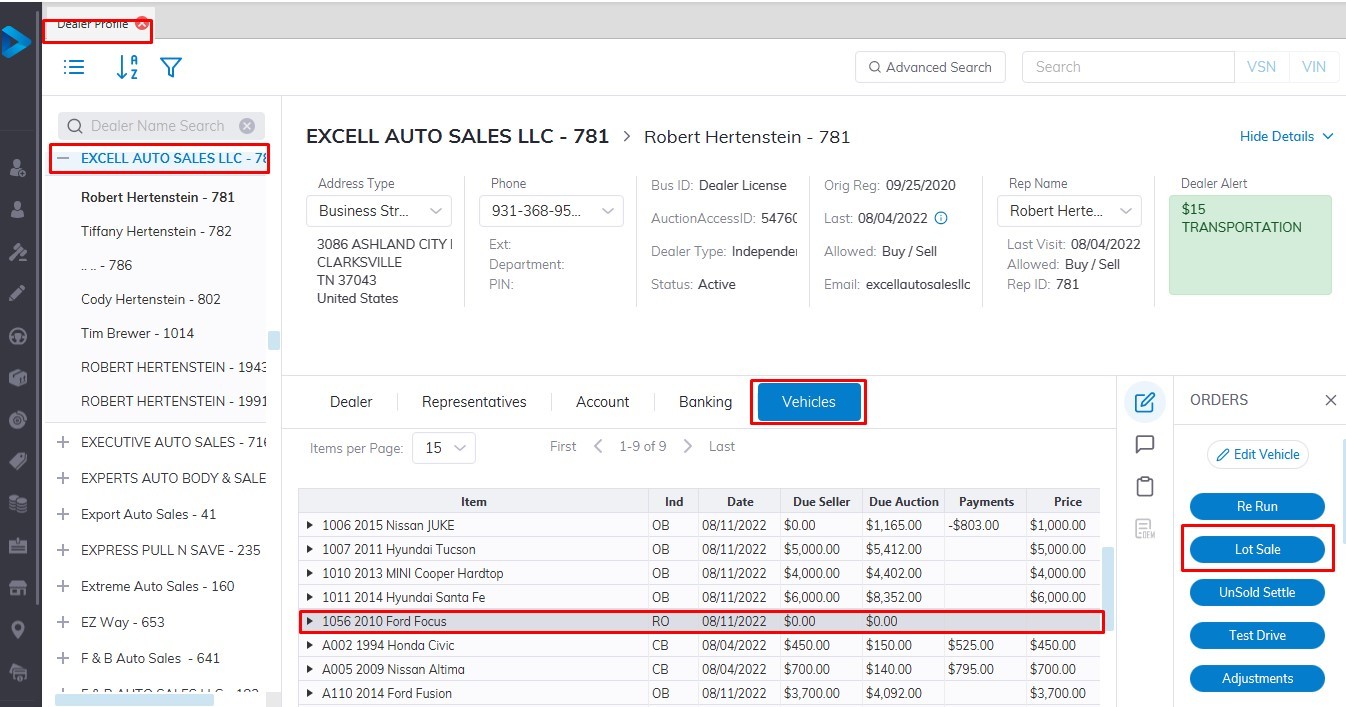
<span style="font-size: medium;">[![lotsale1.jpg](https://cam3-wiki.auctionstreaming.com/uploads/images/gallery/2022-08/scaled-1680-/lotsale1.jpg)](https://cam3-wiki.auctionstreaming.com/uploads/images/gallery/2022-08/lotsale1.jpg)</span>

<span style="font-size: medium;">Select</span>

- <span style="font-size: medium;">The Dealer </span>
- <span style="font-size: medium;">Then select the Vehicle Tab.</span>
- <span style="font-size: medium;">Select the vehicle you wish to Sell.</span>
- <span style="font-size: medium;">Select the Lot Sale order button.</span>
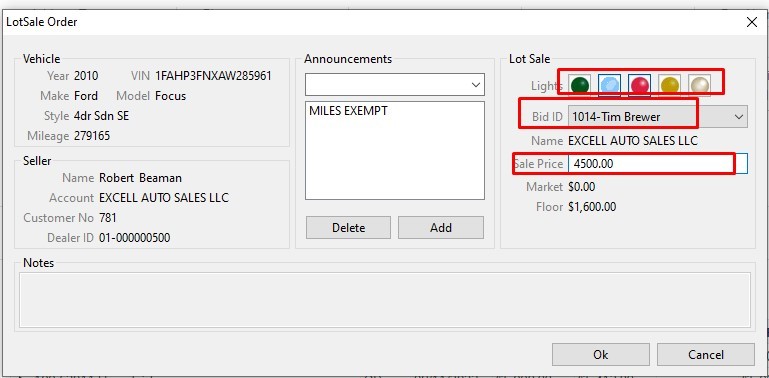
- <span style="font-size: medium;">Input Bid ID or select from the drop-down listing and Price.</span>
- <span style="font-size: medium;">Click 'OK' to Complete the Sale</span>

[![lotsale2.jpg](https://cam3-wiki.auctionstreaming.com/uploads/images/gallery/2022-08/scaled-1680-/lotsale2.jpg)](https://cam3-wiki.auctionstreaming.com/uploads/images/gallery/2022-08/lotsale2.jpg)

[<span style="text-decoration: underline;">**<span style="font-size: medium;">Vehicle Orders</span>**</span>](https://cam3-wiki.auctionstreaming.com/books/cams-3-wiki-faq/page/vehicle-orders)

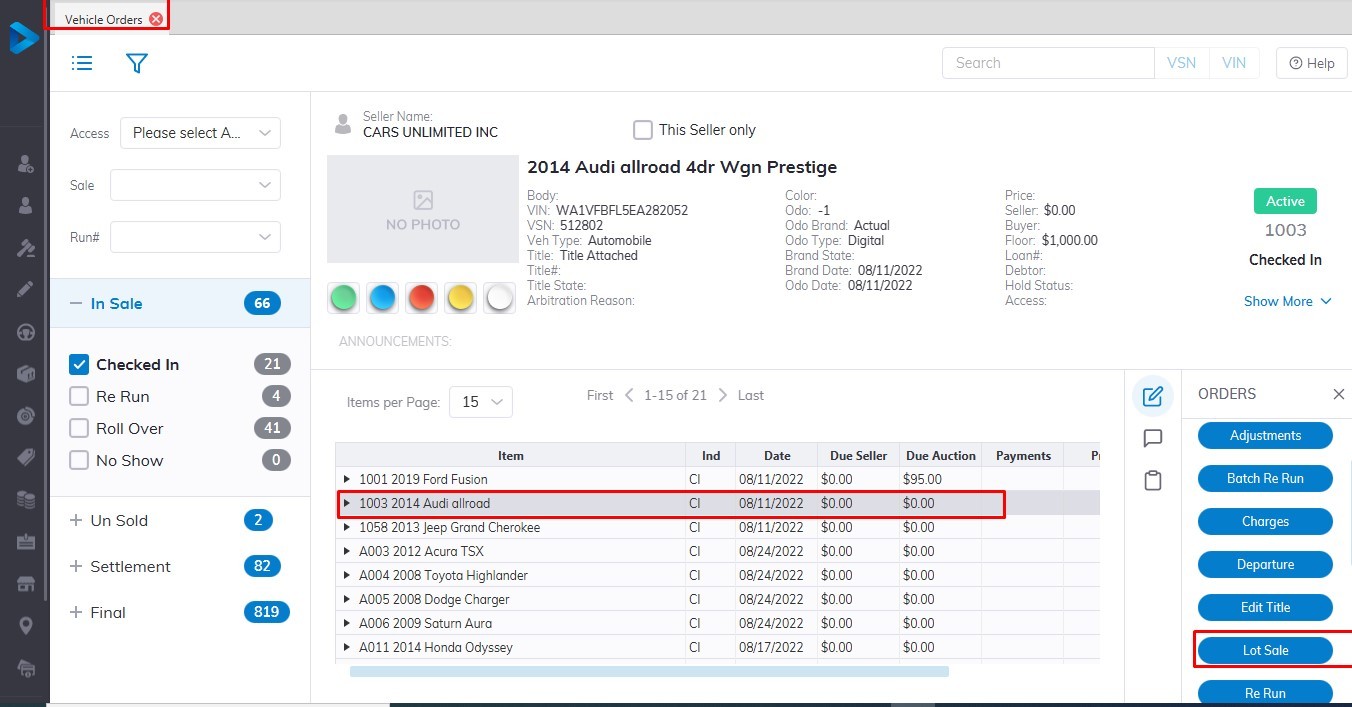
<span style="font-size: medium;">[![lot1.jpg](https://cam3-wiki.auctionstreaming.com/uploads/images/gallery/2022-08/scaled-1680-/lot1.jpg)](https://cam3-wiki.auctionstreaming.com/uploads/images/gallery/2022-08/lot1.jpg)</span>

<span style="font-size: medium;">Select the [**Vehicle Order**](https://cam3-wiki.auctionstreaming.com/books/cams-3-wiki-faq/page/vehicle-orders) profile from the main menu</span>

- <span style="font-size: medium;">Then select the Vehicle you wish to be sold from the vehicle orders application</span>
- <span style="font-size: medium;">Select the Lot Sale order button</span>
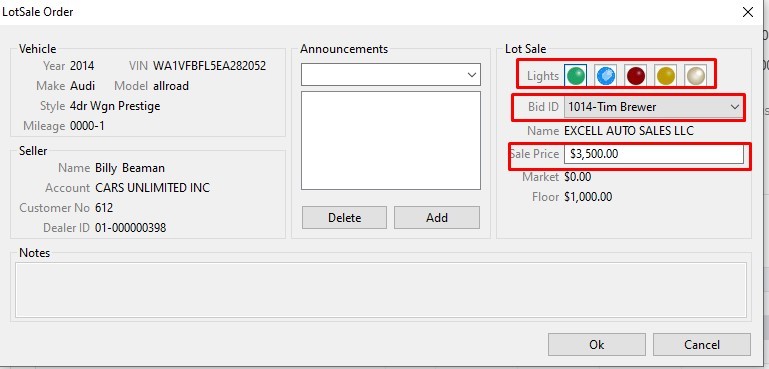
- <span style="font-size: medium;">Input Bid ID or select from the drop-down listing and Price</span>
- <span style="font-size: medium;">Click 'OK' to Complete the Sale.</span>

- <span style="font-size: medium;">[![lot2.jpg](https://cam3-wiki.auctionstreaming.com/uploads/images/gallery/2022-08/scaled-1680-/lot2.jpg)](https://cam3-wiki.auctionstreaming.com/uploads/images/gallery/2022-08/lot2.jpg)</span>

**<span style="font-size: medium; background-color: #f1c40f;">Note: Lot Sales do not automatically print an invoice, you must print one manually from the Reports menu.</span>**

<span style="font-size: medium;"><video controls="controls" height="400" width="800"><source src="https://cam3-wiki.auctionstreaming.com/attachments/23"></source></video></span>